- AI Marketing Spark
- Posts
- Mastering ChatGPT’s Custom Instructions: Your Gateway to Advanced Marketing With AI
Mastering ChatGPT’s Custom Instructions: Your Gateway to Advanced Marketing With AI
Unlock the Full Potential of AI in Your Marketing Strategies
Michael Sherriff
October 17, 2023
The AI Marketing Spark Newsletter
Issue #1 - October 17th, 2023
What’s In This Issue:
Featured Article:
Dive into the transformative feature of ChatGPT - Custom Instructions. Discover how this game-changing addition can tune ChatGPT to your brand's voice, simplifying the content creation journey while hitting the right marketing notes. It's about making an AI tool work seamlessly for you, amplifying your marketing strategies with tailored content.
Also In The News:
A look at what’s new in the world of Marketing and AI.
Have Your Say:
Where you tell us if this newsletter hit the mark or missed by a mile.
Featured Article
Mastering ChatGPT’s Custom Instructions

The Challenge:
The need for fresh, engaging content is relentless in the marketing world. It's like a beast that constantly needs feeding. And trust me, crafting content that captures attention and drives action is no small feat. It's a blend of art, science, and a dash of magic, or so it seems.
We all have been there - the brainstorming sessions that stretch for hours, the multiple drafts, the endless revisions, and, oh, let's not forget, the SEO optimization. It's a cycle that repeats with every piece of content. And just when you think you've nailed it, the demand for personalized content comes knocking at the door.
Today's consumers crave content that speaks to them, understands their needs, and offers value. Meeting this demand means diving into data analytics to tailor content for various segments of your audience, which is a task in itself.
While effective, the traditional way of creating content can feel like you're on a hamster wheel. It's time-consuming, laborious, and, let's face it, it can be draining.
The AI Solution.
Enter ChatGPT, your new buddy in the marketing arena. This isn't just about spitting out generic content; it's about generating creative, coherent, and contextually relevant content at an unheard-of pace. And the beauty of it? It doesn't just stop at creating content; it helps optimize it for SEO, crafting engaging headlines, and even brainstorming ideas.
While ChatGPT was already a powerhouse, introducing Custom Instructions took things to a whole new level. Imagine being able to guide this AI buddy of yours to create content that aligns with your brand voice, target audience, and marketing objectives. It's like having a seasoned marketer on your team who's there 24/7, ready to churn out content that resonates.
With Custom Instructions, you can give ChatGPT a better sense of what you're looking for. It's like whispering into its ear and saying, "Hey, this is what I need. Can you do it this way?" And it listens, understands, and acts on it. This level of customization ensures the content you get isn't just good; it's excellent and tailored to your needs.
Integrating ChatGPT into your marketing strategies is like having an extra set of hands or brain wired for marketing excellence. It's not just about easing the content creation process; it's about unlocking a world of possibilities in marketing creativity, efficiency, and effectiveness.
Understanding ChatGPT.
Getting started with ChatGPT and its Custom Instructions isn't rocket science, but it does require a little setup. It's all about giving ChatGPT a sense of what you're after. It's like setting the stage for a performance. You provide the context, and ChatGPT takes the spotlight to deliver a show that's in tune with your marketing objectives.
The concept of providing context through Custom Instructions is a game changer. It's about communicating with ChatGPT in a way that it gets you. It's about crafting instructions that guide the AI to generate content that hits the mark.
You're not always starting from scratch once you've set up your Custom Instructions. It retains the instructions, making your content creation journey smoother and more efficient with every interaction.
How To Setup Custom Instructions.
Setting up custom instructions with ChatGPT is straightforward. Once you're on the platform, just head over to the profile settings section, which you'll typically find symbolized by three dots or a similar icon next to your username. Here, you'll find two key questions: one asking about what ChatGPT should know about you for better responses and another about how you'd like ChatGPT to respond.
Think of your answers to these questions as your ChatGPT "style settings". Once you've set these up, they'll apply to all your new conversations with ChatGPT. Just a heads-up, you can’t switch up these instructions midway through a chat; you'd need to start a fresh conversation for new custom instructions to kick in.
Now, the real magic of custom instructions is how they give context to ChatGPT, which enhances the relevancy and specificity of the content it churns out. For example, by sharing details about your role, background, or what you're aiming for with the project, you’re steering ChatGPT to whip up outputs that hit the mark for your needs or the project's goals.
Also, laying down your preferences on how you want the responses—whether you’re after a formal tone, a chatty style, or a preference for a bulleted list over a paragraph format—helps tailor the outputs to your liking.
Here’s where to find “Custom Instructions”.
When logged into your ChatGPT account on a desktop/Laptop, click in your name in the lower left of the screen, and a sub-menu pops up, where you’ll see ‘Custom instructions’ as an option.
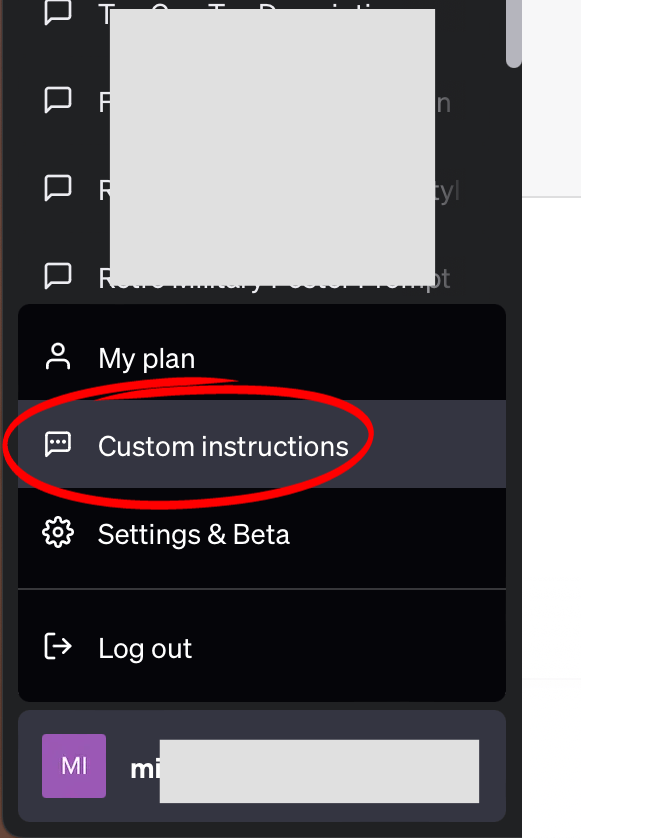
Click on that to open up the Custom Instructions window which will look like this.
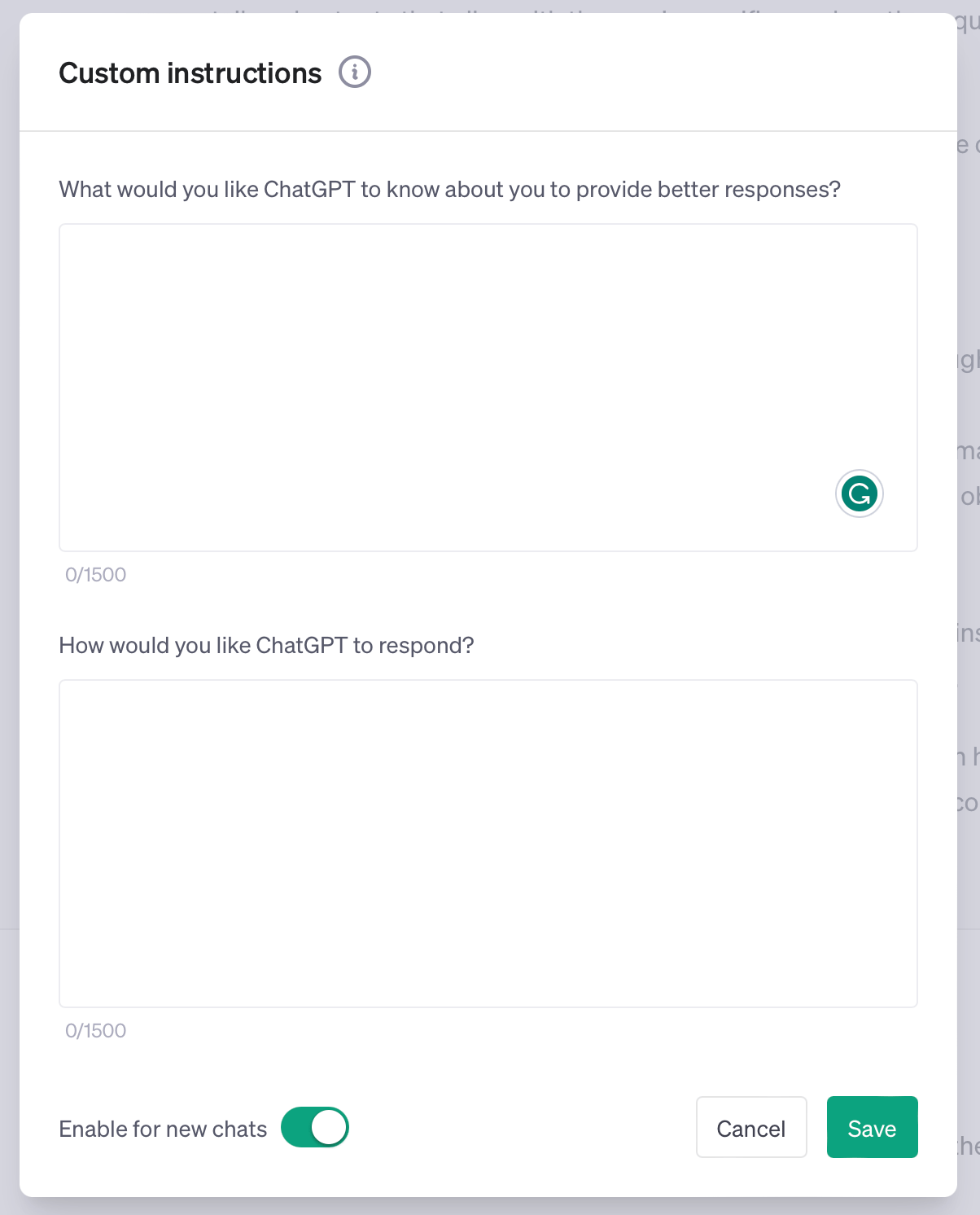
There is a tooltip pop up if you click inside each box, which gives you an idea of what you can put in each box, such as,
Where are you based?
What do you do for work?
What are your hobbies and interests?
What subjects can you talk about for hours?
What are some goals you have?
For the second box, these tooltips include,
How format or casual should ChatGPT be?
How long or short should responses generally be?
How do you want to be addressed?
Should ChatGPT have opinions on topics or remain neutral?
What you enter in these boxes will be different than what other people might enter, hence the term ‘Custom Instructions’.
Here is the text I entered in the first box which is specific to me:
“My name is Michael, and I'm happy for you to call me that. I am based in Scotland in the UK. I own a company called Hard Deck Media Ltd. I run a FB Group called Top Gun Fans that is for fans of both Top Gun movies. I use ChatGPT to create a lot of content, such as blog posts and FB posts for the Top Gun Fans site and FB group. I also use ChatGPT to help me write the marketing materials.”
Here’s a breakdown of why I entered this and how it affects ChatGPT.
Name ("Michael"):
Reason: Personalizing interactions with the AI.
Benefit: Creates a more engaging and personable user experience.
Location (Scotland, UK):
Reason: Providing geographical context.
Benefit: Guides ChatGPT to align its responses with local or regional nuances, which could be crucial, especially in marketing content.
Company Ownership (Hard Deck Media Ltd):
Reason: Sharing professional background and focus area.
Benefit: Helps in generating more business-centric or industry-relevant content.
FB Group Management (Top Gun Fans):
Reason: Highlighting a specific community you manage.
Benefit: Enables the creation of content that resonates with this particular audience.
Usage of ChatGPT for Content Creation:
Reason: Informing the AI about the primary use case.
Benefit: Ensures the generated content aligns with the tasks at hand, like creating blog posts or social media content.
Usage of ChatGPT for Marketing Materials:
Reason: Expanding on the scope of your interaction with ChatGPT.
Benefit: Provides a broader understanding for ChatGPT to assist effectively in various marketing-related tasks.
By inputting this information into the custom instructions, I’m essentially priming ChatGPT with a rich context about who I am, what I do, and what I aim to achieve with the AI. This, in turn, is likely to result in more tailored, relevant, and effective interactions and outputs, making my content creation and marketing efforts more efficient and aligned with my objectives.
For the second box I entered:
“You can respond in a casual way, such as with friends who have known each other for a long time and get on well. These friends want the very best for each other and provide support in any way they can. I am happy for you to address me as Michael. Don't be cheesy. When you write content, please ask me if it should be written in British or American English. When I ask for help with a task such as marketing, I want you to ask questions to make sure you choose the correct expert knowledge to apply. (which expert persona to assume). My favourite persona/style for email marketing is Russell Brunson, so please use all of your training data specific to what you know about how Russell creates marketing material and sales copy. Think about each task I give you and apply logic when asking questions that you feel are specific to that task or that would help give the best results.”
Here’s the rationale for entering that information.
Casual Tone:
Reason: To foster a friendly and approachable interaction environment.
Benefit: Makes the conversation more enjoyable and less formal, promoting open communication.
Address as Michael:
Reason: Personalization and familiarity.
Benefit: Creates a more personal engagement, which can be reassuring and pleasant.
Language Preference Inquiry (British or American English):
Reason: To ensure the text aligns with the linguistic norms of the intended audience.
Benefit: Enhances readability and relatability of the content.
Ask Questions for Task Clarification:
Reason: To ensure a clear understanding of the task and its objectives.
Benefit: Results in more accurate and relevant assistance, reducing the chances of misinterpretation.
Expert Persona Clarification:
Reason: To tailor the assistance based on proven or favored strategies.
Benefit: Increases the effectiveness and resonance of the marketing materials.
Preference for Russell Brunson’s Style:
Reason: Admiration for Brunson’s marketing strategies and style.
Benefit: Emulating successful marketing strategies can potentially lead to better engagement and conversion rates.
Applying Logic to Questions:
Reason: To encourage a thoughtful approach to problem-solving.
Benefit: Promotes a more effective and efficient resolution to challenges.
By specifying these instructions, I am setting the stage for a more personalized, understanding, and effective interaction with ChatGPT. This instruction level helps the AI better align with my preferences, the marketing style I admire, and the kind of communication tone you find engaging. Over time, this can lead to better-quality outputs, saving time and possibly contributing to better marketing outcomes.
As a reader of this newsletter, it would be a fair assumption that you’re here to learn more about using AI, such as ChatGPT, for marketing in any role. So, with that, we’ll base all of the following on that.
You might find that some of the text I use for my custom instructions applies to your use, so please feel free to copy anything that you think is useful. However, the magic happens when you personalize your instructions to align closely with your voice, specific marketing goals, and target audience. Custom instructions are like telling ChatGPT exactly how you want your coffee. The more precise you are, the better the brew.
Custom Instructions prime ChatGPT with background and relevant information that it needs to take into account each time you enter a prompt. The difference between the response that it gives you for the same prompt is huge when you use, or don’t use, Custom Instructions.
Take this as an example:
(Prompt with custom instructions)
“I want to write a FB post for the Top Gun Fans FB group that will ignite/spark a conversation. You can choose the topic of the conversation.”
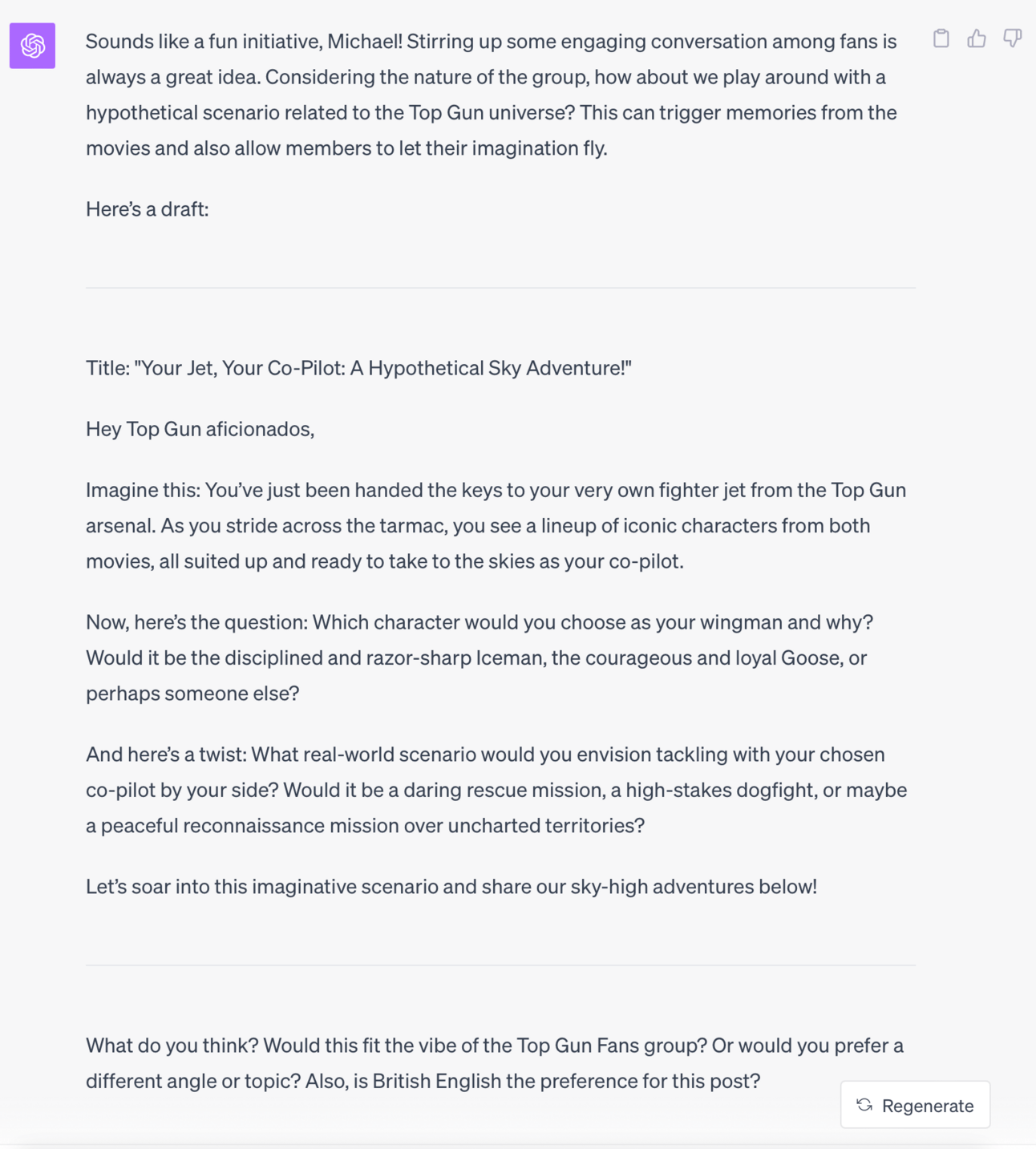
And now, without any custom instructions:
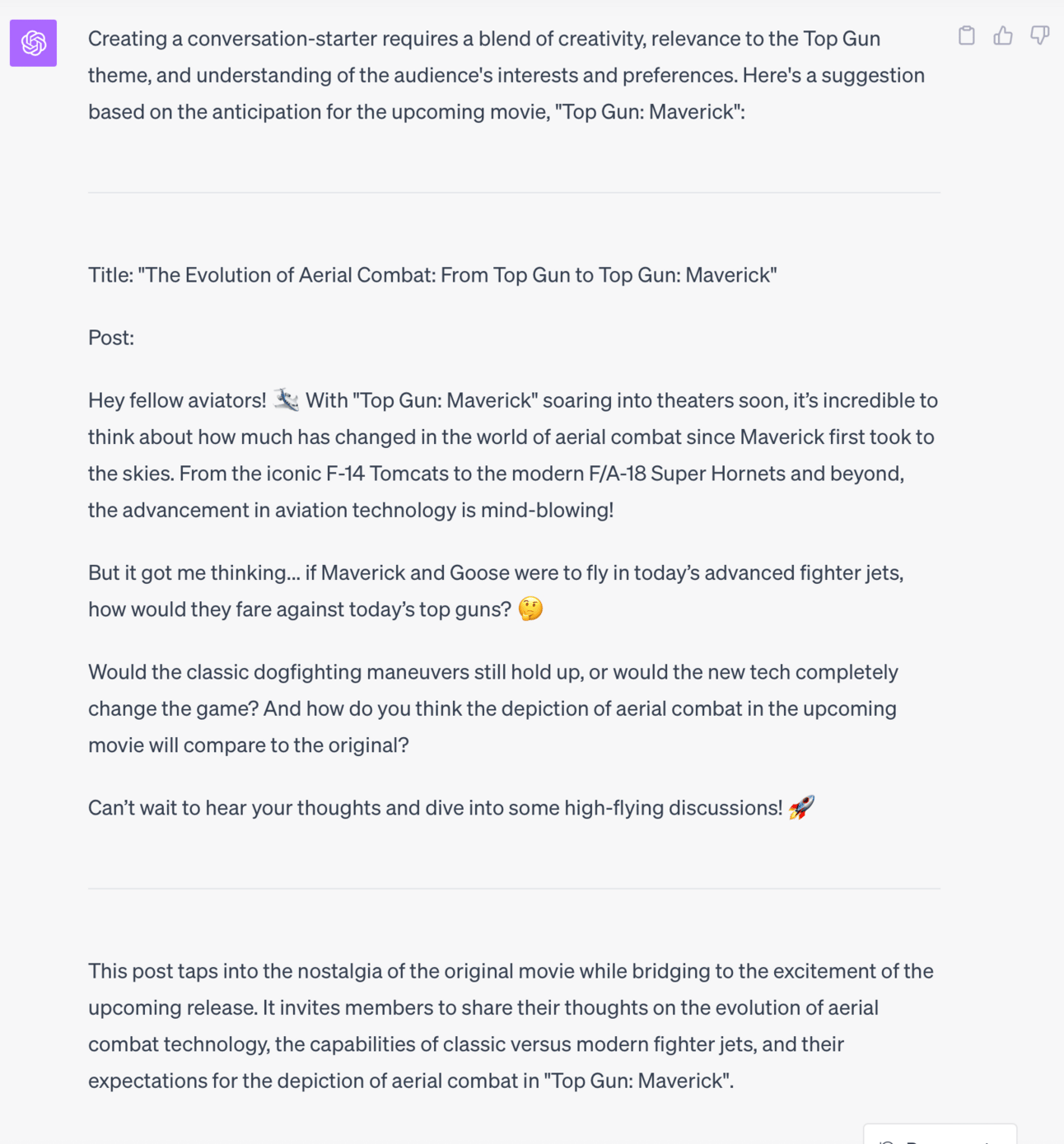
Not only is the second output less personal, but it's also less conversational. It also didn't realize that Top Gun Maverick has already been released. The second version didn't use the style of Russell Brunson, a marketing style that works well. For the sake of comparison, I regenerated the response for both versions (with and without the Custom Instructions), and each time, the version that didn't use Custom Instructions referred to Top Gun Maverick as having yet to be released.
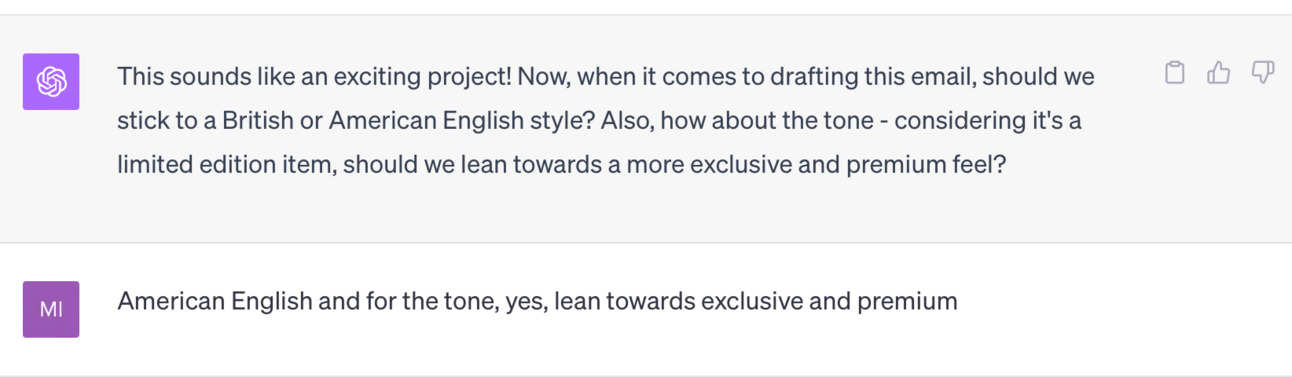
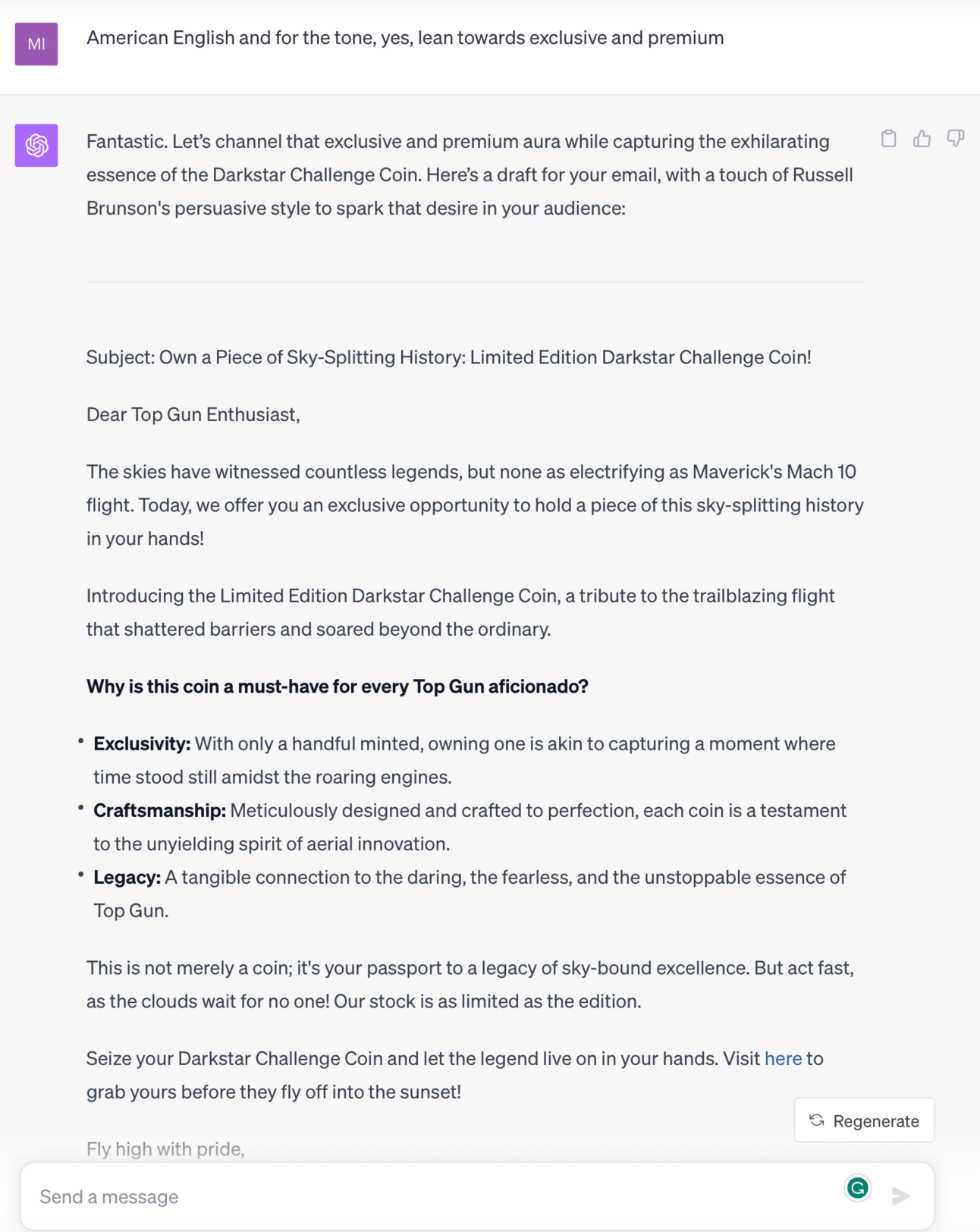
Here's another example, first, with Custom Instructions. I'll use the prompt:
“Help me write an email for this product https://shop.topgunfans.com/products/limited-edition-darkstar-challenge-coin-capture-mavericks-mach-10-flight”
And, now, without Custom Instructions:
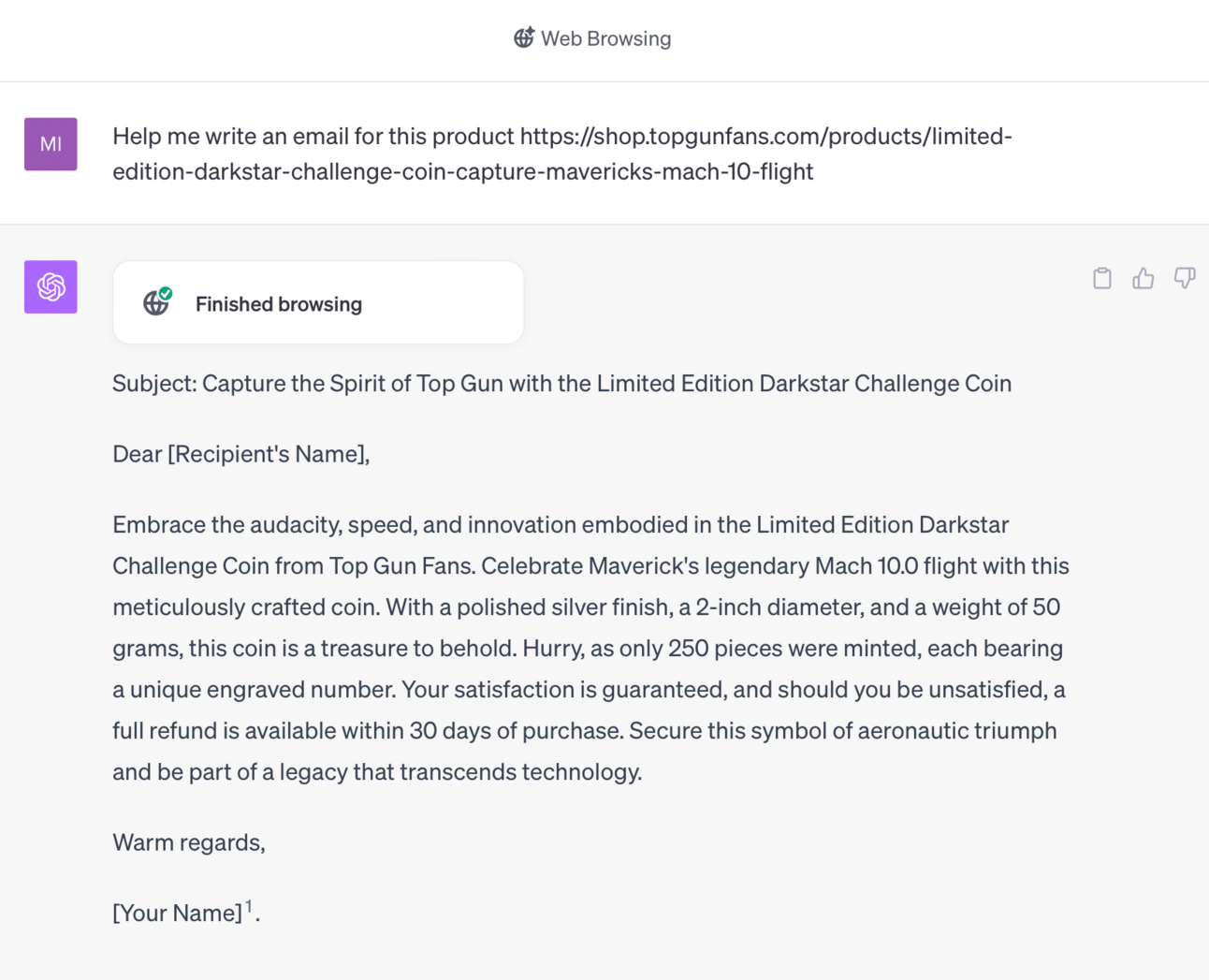
Now, that certainly is a huge difference in outputs. Did you notice that in the first example that used Custom Instructions, it didn’t access the URL I gave it to check what the product is? On previous occasions of using ChatGPT for this specific purpose and product, it has accessed the URL, and I have given it the description of the product, but this was in different chats.
According to ChatGPT, when you start a new chat and ask it, “Do you remember in a previous chat we discussed….” it always answers that it can’t remember information from different chats. So, it’s interesting that ChatGPT (seemingly) remembered the details of the product from a previous/separate chat.
The first example used the information in the Custom Instructions and acted exactly as expected.
In the second example, even though it accessed the product at my online store via the URL I gave it, the output was pretty much just the product description. There is no way I could send that out as an email and expect much in terms of results. I could have just copied and pasted the product description myself.
The difference is like night and day when you use or don’t use Custom Instructions.
Pro Tips for Custom Instructions
Be Precise:
Custom instructions thrive on clarity. The more precise you are with your instructions, the better ChatGPT can align with your objectives.
Start Simple:
If you're new to custom instructions, start with simple directives. As you become more comfortable, you can start adding more complex instructions.
Experiment and Iterate:
Don't hesitate to experiment with different phrasing or instructions to see what yields the best results. Iteration is key to refining your approach.
Use Context:
Providing context helps ChatGPT to generate more relevant and accurate responses. Include necessary background information or parameters to guide the AI.
Maintain Consistency:
Especially when it comes to brand voice and terminology, maintaining consistency across your instructions helps in achieving a uniform tone and style.
Review and Revise:
Always review the outputs and if necessary, tweak your instructions to get closer to the desired output.
Learn from Others:
Look at examples from other users, learn how they frame their instructions, and don’t hesitate to borrow techniques that can enhance your own interactions with ChatGPT.
Stay Informed:
As OpenAI continues to update and upgrade ChatGPT, stay informed about new features or capabilities that could help you make more out of custom instructions.
Seek Community Advice:
Engage with the community to share experiences, learn new tips, and improve your understanding and utilization of custom instructions.
Document Your Progress:
Keep a record of your instruction sets and the results they yield. This documentation can be a valuable resource for refining your strategy over time.
These pro tips are geared towards helping you harness the full potential of custom instructions, making your interaction with ChatGPT a more fruitful and streamlined experience.
Conclusion
ChatGPT's arrival on the scene was nothing short of a revelation, especially its Custom Instructions feature. This little gem is your ticket to cranking out content that's not just personalized and on point but also done with a level of efficiency that's through the roof. It's not about just whipping up content quicker; it's about giving that content a serious leg-up in quality, relevance, and that personal touch that makes your audience feel seen.
The scope of what ChatGPT brings to the marketing table is immense. It's not about just speeding up content creation; it's about taking the quality, relevance, and personal touch of that content up a few notches. This is about making every piece of content strike a chord with your audience.
The magic really happens when ChatGPT's prowess melds with your marketing savvy and creative chops, turning into a marketing powerhouse. It's a call to play around, delve into what ChatGPT offers, and find out how it can be roped in to hit your marketing targets. There's a treasure trove of possibilities tucked away in ChatGPT.
So, dive in, tinker with Custom Instructions, and see how you can tweak your marketing playbook. This is where your journey to mastering high-octane marketing with AI kicks off, and there's a world of potential waiting to be tapped.
Further Resources for Custom Instructions
Here’s the page on ChatGPT’s site about Custom Instructions, so you can check that out, too.

Also In The News:
Forbes: How today’s top marketing leaders are approaching AI
Press Gazette: AI Voice Skyrockets Norway Daily's Audio Reach
Yahoo News: How AI will change the world by 2030
The Guardian: Robots Take Over Dull Meetings, Boosting Employee Freedom
Feedback Section:
We value your insight and are keen to hear your thoughts on this featured article. Your experiences, questions, and suggestions are not just welcomed but crucial for us as we strive to provide content that caters to your interests and needs.
Have you tried using ChatGPT's Custom Instructions for your marketing endeavors? What was your experience?
Do you have any questions regarding the use of Custom Instructions or any of the points discussed in the article?
Are there any topics or areas within AI and marketing you'd like us to delve into in our upcoming editions?
Simply hit the reply button to this email to get in touch and let us know.
That’s all for this week. Thank you so much for reading this newsletter, and we’ll see you next Tuesday in your inbox with another edition of AI Marketing Insights. Stay tuned, stay ahead, stay informed.